The shelf-to-request fee board
Tigbuy takes its service charge on the items inside a delivery request and nowhere else. The board below sorts your items by where they are and shows what that means for the charge.
Your items, from shelf to request
Six example items are loaded. Change any name, price or postage, move items between states, and pick the member level you will hold when you submit. Amounts are in yuan, as on Tigbuy.
Taken when this request is submitted
¥36.40
About $5.60 at Tigbuy’s table rate of 6.500 yuan to the dollar (read 17 October 2026). Worked out on ¥364.00 across 3 items at the standard rate of 10%.
Waiting on the shelf, not charged yet
¥129.00
1 item on the shelf. Still on the way to the warehouse: ¥94.00 across 1 item. These are charged only when a later request includes them, at the rate you hold that day.
Never reached a request
¥66.00
1 item sent back in the warehouse week (Bucket hat). No service charge is worked out on them, because they never reach a delivery request.
Coupon slot. One coupon per delivery request (help 85). It is set against this request’s service charge of ¥36.40; any coupon value above that is not refunded.
At this level you can redeem a $5 coupon (help 49). The board does not convert coupons into yuan.
How to use the fee board
Here is how to use the tool, with one entry per item you have bought or plan to buy.
- Type the item price and the China freight from the listing. If the seller posted several of your items in one box, tick “bought together” on every item after the first, which drops their postage from the base (help 62).
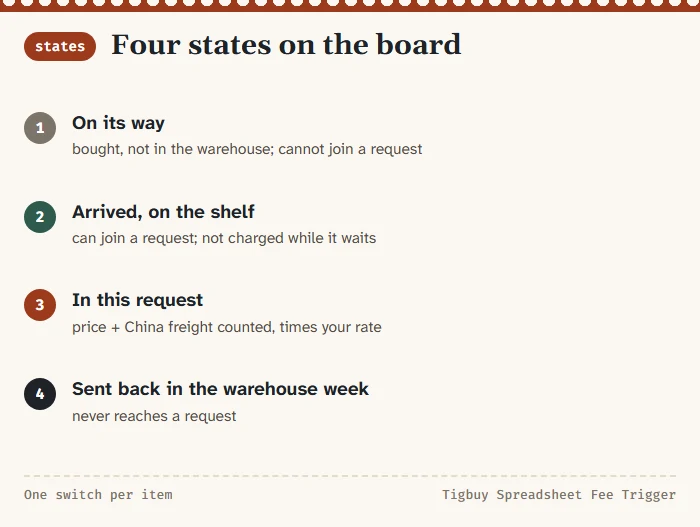
- Set where each item is. On its way means bought but not yet in the warehouse; it cannot join a request. Arrived means it can.
- Move the items you plan to ship now into “In this request”. Mark anything you are sending back during the warehouse week.
- Pick the member level you will hold on the day you submit.
The three boxes update as you go. The button under the list puts the six example items back.
Reading the three boxes
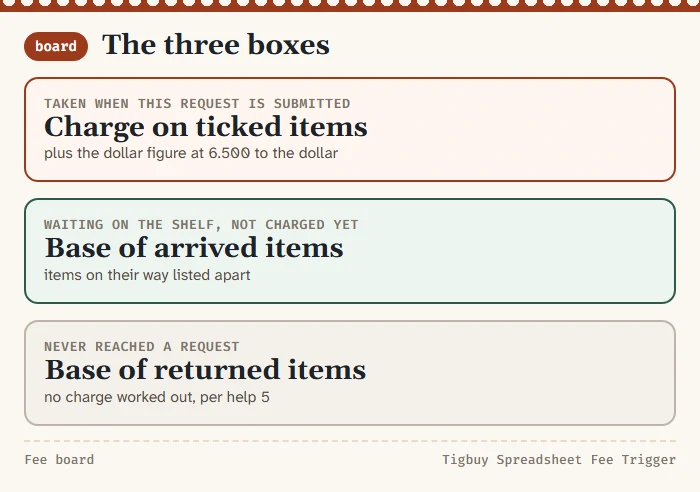
Taken when this request is submitted. The service charge on the items in the request: their prices and freight added up, multiplied by your rate. Under it, the dollar figure Tigbuy’s own table would show, using 6.500 yuan to the dollar as read on 17 October 2026.
Waiting on the shelf. The base of items that have arrived but are not in this request, plus a separate line for items still on their way. None of it is charged yet. When a later request takes them, that request applies the rate you hold then.
Never reached a request. The base of items sent back during the warehouse week. Following help 5, no service charge is worked out on them. The coupon note beside the boxes repeats the one-per-request rule against this request’s charge.
A worked request with the six example items
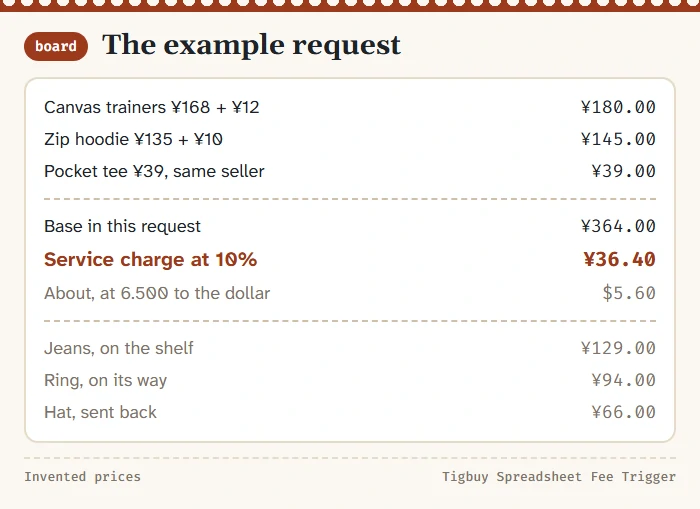
The example loads three items into the request: trainers at ¥168 with ¥12 of postage, a hoodie at ¥135 with ¥10, and a tee at ¥39 bought together with the hoodie, so its postage is not counted. The base is ¥364.00 and the standard charge ¥36.40, about $5.60 on Tigbuy’s table.
Wide-leg jeans at ¥119 plus ¥10 have arrived but stay on the shelf: ¥129 of base, not charged. A ring at ¥88 plus ¥6 is still on its way: ¥94, not chargeable yet. A bucket hat at ¥58 plus ¥8 went back in the warehouse week: ¥66 that never meets the charge.
Switch the level to Diamond and the request charge drops to ¥21.84. Move the jeans into the request and it rises by ten percent of ¥129 at the standard rate.
What the board leaves out on purpose
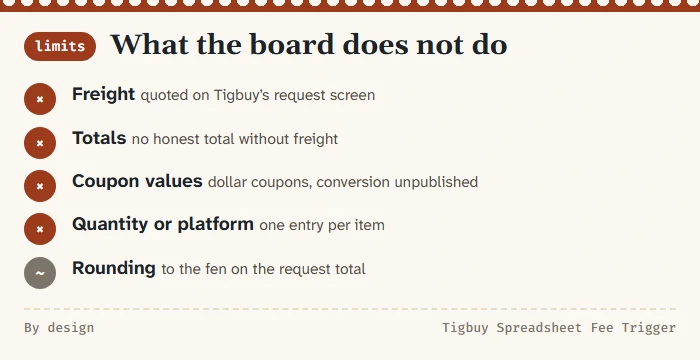
- Freight. International shipping depends on weight, size, line and destination, and is quoted on Tigbuy’s own request screen. It is outside the service charge base.
- Totals. Without freight there is no honest total, so the board does not show one.
- Coupon values. Coupons are written in dollars and the conversion at that step is not published. The board shows the charge a coupon would meet, not what it would save.
- Quantity and platform. Enter one entry per item; the platform does not change the formula.
- Rounding. The board rounds the request charge to the fen. Tigbuy’s checkout may round item by item.
How we tested the board's arithmetic
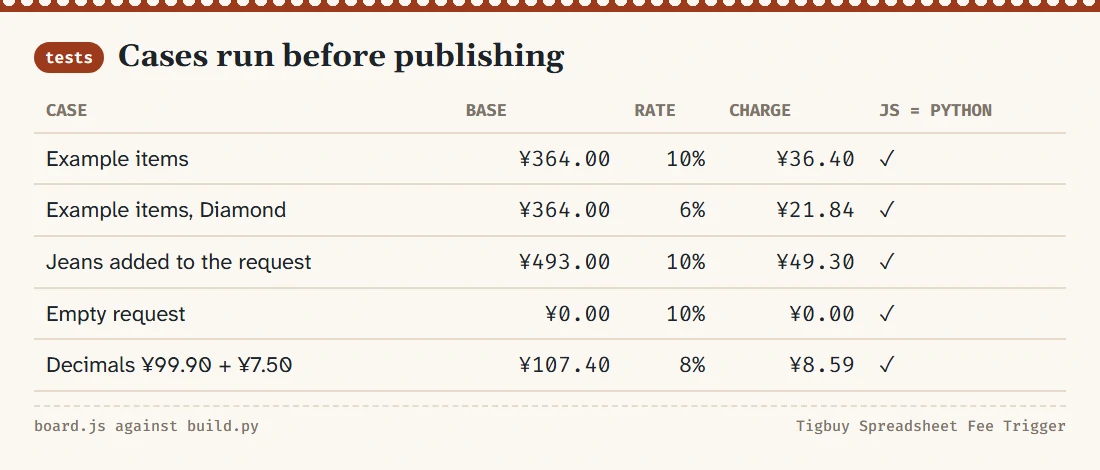
The board’s calculation lives in one small function, and the same function exists in the Python script that builds this site. Before publishing we ran both on the example items and on edge cases: an empty request, every item returned, every member level, prices with decimals, postage removed by the “bought together” switch and a blank price field.
| Case | Base in request | Rate | Charge |
|---|---|---|---|
| Example items | ¥364.00 | 10% | ¥36.40 |
| Example items, Diamond | ¥364.00 | 6% | ¥21.84 |
| Jeans added | ¥493.00 | 10% | ¥49.30 |
| Empty request | ¥0.00 | 10% | ¥0.00 |
| Decimals: ¥99.90 + ¥7.50 | ¥107.40 | 8% | ¥8.59 |
Both versions agreed on every case, and a browser test changed the inputs on the live page and read the boxes back.