Tigbuy's currency table, set beside the market rate
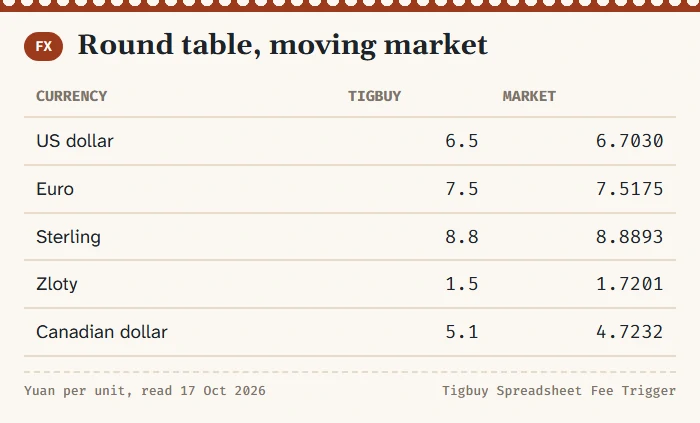
Everything on Tigbuy is priced in yuan, the service charge included. What you see in dollars, euros or zloty is the yuan figure divided by a table Tigbuy keeps itself. This page sets that table beside the market rate on one day.
The charge is worked out in yuan
The help 58 formula runs on yuan: the item price and China freight are listed in RMB, and ten percent of them is a yuan amount. A display currency changes only how that amount is shown to you, through an exchange rate Tigbuy keeps in its own table.
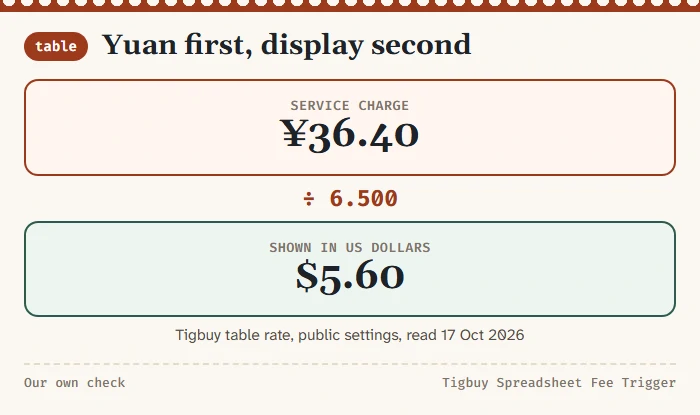
On 17 October 2026 Tigbuy’s own currency settings, which every page loads, gave 6.500 yuan to the US dollar. A service charge of ¥36.40 therefore shows as $5.60, because 36.40 divided by 6.5 is 5.60. Pages read the table and divide; there is no separate dollar price list behind them.
The rate used when an account actually tops up is shown only after login, so we cannot compare it here. Our check is about the table that turns yuan into the figures on screen.
Seven currencies in Tigbuy's table
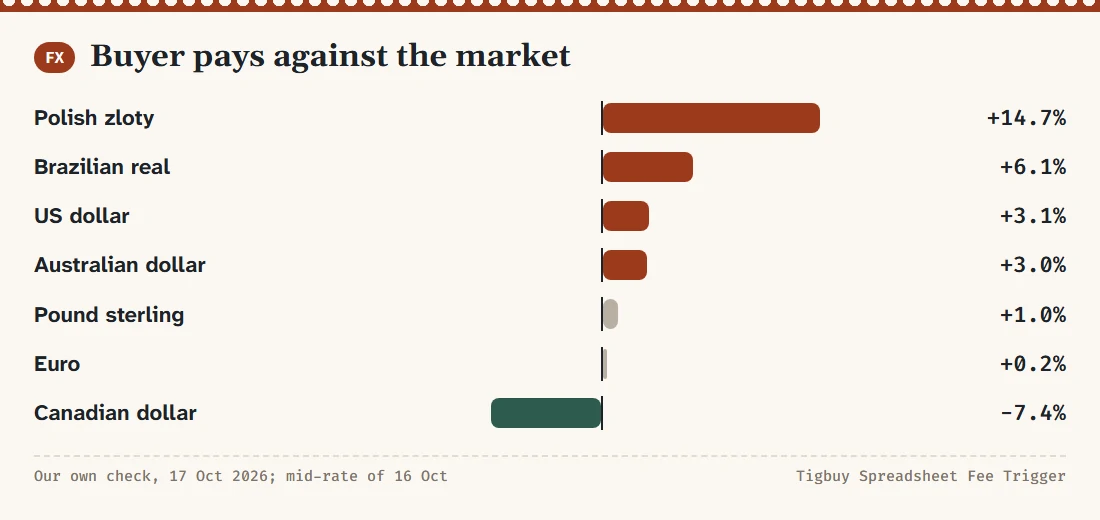
The table below lists the seven display currencies Tigbuy offers beside yuan. The second column is Tigbuy’s rate, the third the market mid-rate published on 16 October 2026, the fourth how much more (or less) a buyer pays per yuan through the table. Our own check, 17 October 2026; the figures expire with the next table change.
| Currency | Tigbuy table (yuan per unit) | Market mid-rate | Buyer pays vs market |
|---|---|---|---|
| US dollar (USD) | 6.500 | 6.7030 | +3.1% |
| Euro (EUR) | 7.500 | 7.5175 | +0.2% |
| Pound sterling (GBP) | 8.800 | 8.8893 | +1.0% |
| Australian dollar (AUD) | 4.500 | 4.6355 | +3.0% |
| Canadian dollar (CAD) | 5.100 | 4.7232 | -7.4% |
| Brazilian real (BRL) | 1.250 | 1.3262 | +6.1% |
| Polish zloty (PLN) | 1.500 | 1.7201 | +14.7% |
Most gaps are small. The two that stand out are the zloty, where the table asks for about 14.7 percent more than the market, and the Canadian dollar, where the table is about 7.4 percent more generous than the market.
One service charge seen through each currency
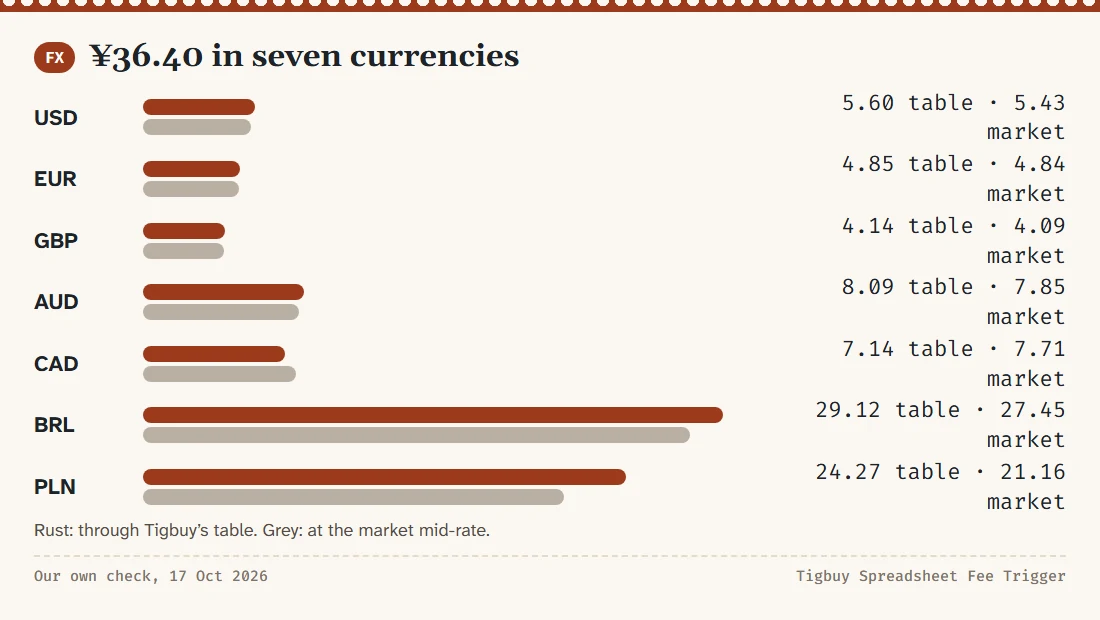
To make the gaps concrete, take the ¥36.40 charge from the fee board’s example and show it in each currency, first through Tigbuy’s table and then at the market rate.
| Currency | Through the table | At market rate | Difference |
|---|---|---|---|
| USD | 5.60 | 5.43 | +0.17 |
| EUR | 4.85 | 4.84 | +0.01 |
| GBP | 4.14 | 4.09 | +0.04 |
| AUD | 8.09 | 7.85 | +0.24 |
| CAD | 7.14 | 7.71 | -0.57 |
| BRL | 29.12 | 27.45 | +1.67 |
| PLN | 24.27 | 21.16 | +3.11 |
On one charge the differences are cents, or a few zloty. They grow with the size of the payment, but the service charge is rarely the largest line in an order, so the table matters more for the item prices you top up for than for the charge itself.
Why the gap differs by currency
Tigbuy’s table uses round figures: 6.5 for the dollar, 7.5 for the euro, 8.8 for sterling, 1.5 for the zloty. Market rates move every day and run to four decimals. A rounded rate set some time ago drifts away from the market at a different speed for each currency, which is why one table can be close for euros and far for zloty.
We do not know how often Tigbuy updates the table; its help pages say nothing about a review cycle. Treat our percentages as a snapshot taken on one day and re-check before a large top-up. This site will read the table again by 31 October 2026 and log the result on the dated notes page.
Ways to pay in, and the fee shown at checkout
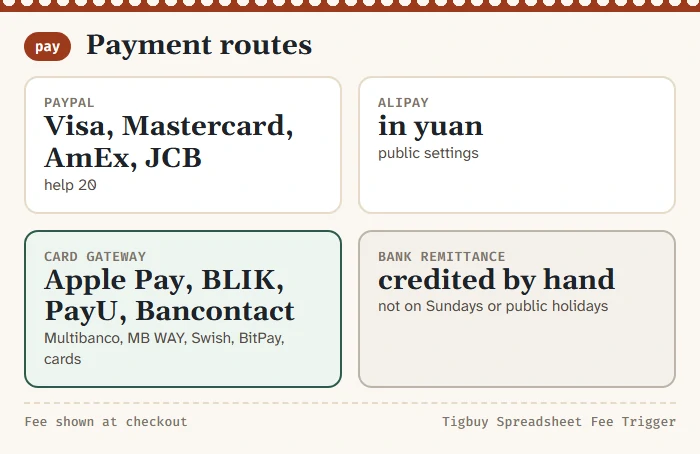
Tigbuy’s public payment settings list PayPal; Alipay in yuan; a card gateway offering Apple Pay, Multibanco, MB WAY, Bancontact, PayU, BLIK, Swish, BitPay and ordinary bank cards; and bank remittance, which is credited by hand. help 20 adds that PayPal accepts Visa, Mastercard, American Express and JCB cards.
Each method carries a payment-processing fee, shown at checkout. We do not print percentages: the help pages quote figures from an older template, and the settings that hold the current ones are not labelled on any public page.
Manual remittance top-ups are not processed on Sundays or public holidays. If a request is waiting on a transfer, send it early in the week.
Getting an unused balance back
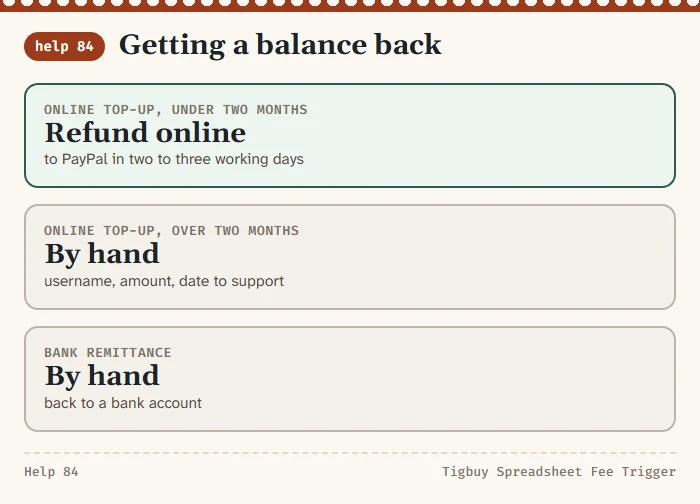
help 84 separates refunds by how the money came in. Online top-ups can be refunded online within two months of the top-up, back to PayPal in two to three working days. After two months you send customer service your username, the amount, the date of the last top-up and the yuan amount to refund, and finance staff process it by hand.
Offline remittances are refunded by hand to a bank account, with the same details plus the bank and card holder.
For fee planning, check the refund route for your actual payment method and top-up date. The published online process has a two-month window; approval and processing can depend on the transaction.
Small leftovers are common after a request, because freight is worked out to the fen. If the balance is small and another order is likely soon, leaving it in the account can be less work than a refund.